
In this story
Artificial intelligence has changed the way people create digital content. In the past, creating a high quality image, editing a photo, or producing a video often required professional software, technical skills, and a lot of time. Today, AI tools have made many of these creative tasks much easier. One platform that brings several AI powered creative features together is Dezgo.
Dezgo is an online AI image and video generation platform designed to help users create visual content from simple text instructions. It can also work with existing images, allowing users to transform, edit, upscale, or improve visual content with the help of artificial intelligence. The platform supports different AI models and creative workflows, making it useful for beginners, content creators, designers, marketers, artists, and people who simply want to experiment with AI.
The main idea behind Dezgo is simple. Instead of creating every visual element manually, users can describe what they want and allow an AI model to generate or modify the result. This makes the creative process faster and more accessible. The platform also provides different settings that allow users to control aspects of the generation process.
What Is Dezgo
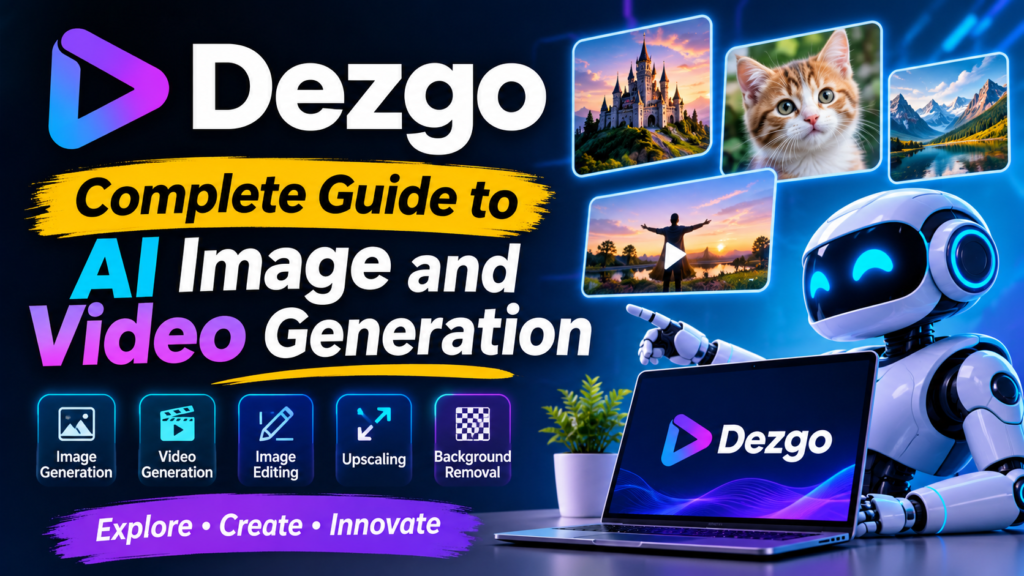
Dezgo is an AI powered online platform for generating and editing images and videos. Users can enter a text prompt describing a desired scene, character, object, style, or concept, and the platform uses an AI model to create visual content based on that description.
The platform originally became known for AI image generation and Stable Diffusion based tools, but its current ecosystem includes a much broader range of models and creative applications. Its official platform now includes text to image, image to image, image editing, background removal, image upscaling, and several text to video and image to video options.
This variety makes Dezgo more than a basic AI image generator. It can be used as a creative workspace where users can move from an initial idea to an edited or enhanced final visual.
For example, someone can start with a written idea such as a futuristic city at sunset and generate an image from it. Another user may upload an existing photograph and describe changes they want to make. A designer may create a basic visual and then upscale it for better quality. A video creator may use an AI video model to turn a concept or image into moving content.
This flexibility is one of the main reasons AI creative platforms are becoming increasingly popular.
How Dezgo Works
The basic workflow behind Dezgo is based on artificial intelligence models that understand text instructions and visual information. When a user enters a prompt, the selected AI model interprets the description and attempts to create an output that matches the requested concept.
A prompt can describe the subject, environment, lighting, camera style, artistic appearance, mood, colors, composition, and other details. A more specific prompt can often help the AI understand the user’s intention more clearly.
For example, instead of simply writing “a city,” a user could describe a modern city at night with tall glass buildings, glowing street lights, wet roads, cinematic lighting, realistic photography, and a wide angle view. The additional information gives the AI more context.
Dezgo also provides advanced settings in many of its tools. Depending on the selected model, users may be able to adjust resolution, aspect ratio, negative prompts, guidance, sampling steps, seed values, image count, and other parameters.
The exact controls can vary depending on the model being used. This is useful because different creative tasks may require different settings.
Dezgo AI Image Generation
AI image generation is one of the most important features associated with Dezgo. The platform allows users to generate images from written descriptions, which means that a person does not necessarily need drawing or professional design skills to create a visual concept.
Text to image generation can be useful for many different purposes. Bloggers can create article illustrations, social media creators can develop visual concepts, businesses can experiment with product scenes, and designers can use AI generated images as creative starting points.
Dezgo provides multiple image generation models, including different Stable Diffusion based models as well as newer AI model families. Its model collection includes options designed for realistic images, anime, artistic visuals, illustrations, and other creative styles.
The choice of model can have a major effect on the final result. A realistic model may be better for photography style images, while an anime model may be more suitable for illustrated characters. Users can experiment with different models to discover which one works best for their particular prompt.
Text to Image Features
The text to image workflow is designed to be straightforward. Users describe their desired image and select an appropriate model and settings before generating the result.
One useful feature is the ability to select different image orientations. Depending on the tool and model, users can create portrait, square, or landscape images. This can be helpful when preparing content for websites, social media platforms, advertisements, presentations, or other digital projects.
The quality of an AI generated image depends on several factors. The model, prompt quality, resolution, guidance settings, sampling steps, and other parameters can all influence the final result.
A good prompt normally explains the most important parts of the image clearly. The subject should be identified first, followed by important environmental and visual details. Style and lighting can then be added to further guide the model.
Dezgo Image Editing
Creating an image from scratch is not the only purpose of Dezgo. The platform also offers tools that allow users to work with existing images.
Image editing with AI can be useful when someone wants to change a particular part of a picture without recreating the entire image manually. A user can upload an image and provide a text instruction describing the desired modification.
For example, someone might want to change the background of a photograph, add an object, alter the environment, or create a different visual interpretation of the original picture.
Dezgo provides image editing workflows powered by different AI technologies. Its current image tools include image to image workflows and dedicated editing capabilities.
This approach can save time compared with traditional editing when the desired change is difficult to achieve manually.
Image to Image Generation
Image to image generation works differently from simple text to image creation because the AI receives an existing image as part of the creative input.
The uploaded image provides visual information that the AI can use while following the user’s written instructions. This allows users to transform an existing image into a different style or visual concept.
For example, a simple photograph could be transformed into an artistic illustration. A rough visual concept could be changed into a more polished scene. A landscape could be reimagined with a different atmosphere.
The amount of influence the original image has can depend on the available settings. Some workflows allow users to control how closely the output should follow the source image.
This makes image to image generation particularly useful for creators who already have a visual starting point but want to explore alternative versions.
AI Image Upscaling
Image quality is important when visual content is used professionally. Small or low resolution images can appear blurry when enlarged. AI upscaling attempts to improve this situation by increasing the resolution while preserving important visual details.
Dezgo provides an AI upscaling tool that can increase image resolution using Real-ESRGAN technology. Its current online tool supports image upscaling by a factor of two.
Upscaling can be useful for older images, AI generated visuals, website graphics, thumbnails, and other digital content.
It is important to remember that upscaling does not magically recreate every missing detail perfectly. The quality of the original image still matters. However, AI based upscaling can make an image more suitable for situations where a larger output is required.
Background Removal
Another useful type of image editing is background removal. Removing a background manually can take time, especially when the subject contains complicated edges such as hair, clothing, plants, or other fine details.
AI based background removal can automatically detect the main subject and separate it from the surrounding background.
This can be useful for product images, profile pictures, promotional graphics, website designs, social media content, and presentations.
The result can then be placed on a different background or used with other design elements.
Dezgo AI Video Generation
AI video generation is becoming an important part of modern creative tools, and Dezgo has expanded beyond still images to support video generation.
The platform currently offers multiple text to video and image to video models. Its available models include technologies such as Kling, WAN, FLUX, HeyGen, Seedance, Veo, and other video generation systems.
Text to video allows a user to describe a scene and ask the AI to generate moving visual content. Image to video can start with an existing image and attempt to add motion based on the user’s instructions.
This can be useful for social media videos, creative experiments, advertisements, concept demonstrations, short visual stories, and other forms of digital content.
AI video generation is generally more demanding than simple image generation, so processing time and available settings can vary between models.
Dezgo Models
One of the strongest aspects of Dezgo is the range of AI models available through the platform.
Different models are designed with different strengths. Some focus on realistic images, some are better for illustrations, while others are optimized for animation, anime, artistic designs, or video.
The current Dezgo model collection includes newer systems from several AI developers and companies. The platform lists models from areas such as FLUX, Google, Krea, Kling, Alibaba, and HeyGen, alongside established Stable Diffusion models.
This gives users more freedom than a platform that depends on only one model.
Model selection can also become part of the creative process. If one model produces results that do not match the user’s expectations, another model can be tested using the same or an improved prompt.
Prompt Writing for Dezgo
Prompt writing is one of the most important skills for getting better results from an AI image generator.
A prompt is simply an instruction given to the AI. However, the quality of that instruction can affect how well the final image matches the user’s idea.
A weak prompt may contain only a few general words. A stronger prompt provides useful details about the subject, environment, style, lighting, composition, and desired quality.
For example, “a car” gives the AI very little information. A more detailed instruction might describe a modern sports car driving through a rainy city at night, with reflections on the road, cinematic lighting, realistic photography, and a wide angle composition.
The second description provides more creative direction.
Dezgo’s own guidance explains that users can improve results by making descriptions more specific, removing unnecessary words, arranging important concepts earlier, and adjusting parameters such as guidance and negative prompts when appropriate.
Negative Prompts in Dezgo
Negative prompts are another useful feature available in several Dezgo workflows.
A negative prompt tells the AI what the user does not want to see in the result. This can be useful when certain unwanted characteristics repeatedly appear in generated images.
For example, a user may want to reduce the chances of blurry details, distorted anatomy, extra limbs, poor hands, watermarks, or other unwanted visual problems.
The effectiveness of a negative prompt depends on the model and generation settings. It should not be treated as a guaranteed solution, but it can help guide some image generation workflows.
Users should keep negative prompts relevant rather than filling them with a very long collection of unrelated terms.
Guidance and Sampling Steps
Some Dezgo image tools provide settings such as guidance and sampling steps.
Guidance controls how strongly the model attempts to follow the prompt. Higher guidance can make the AI follow the written description more closely, but extremely high values may sometimes introduce unwanted artifacts.
Sampling steps influence how much processing the model performs while creating the image. More steps can sometimes provide additional detail, although more processing does not automatically guarantee a better image.
The ideal settings depend on the selected model and the type of image being generated.
For beginners, using the default settings first is usually a practical approach. Once the basic workflow is understood, users can experiment with individual settings rather than changing everything at once.
Is Dezgo Free
One of the common questions about Dezgo is whether the platform can be used for free.
According to the official FAQ, Dezgo provides a free version that can be used without registration. The free version has limitations related to factors such as rate limits, image resolution, image quality, and access to some compute intensive features.
Dezgo also provides an optional Power Mode for users who want fewer restrictions.
Power Mode follows a prepaid pay as you go approach rather than a recurring monthly subscription. The cost of a request depends on factors such as the selected model, image size, and other generation parameters.
This structure can be attractive to people who do not want to commit to a monthly plan.
Before paying for any AI service, users should always check the current pricing and terms because AI model costs and available features can change over time.
Dezgo Power Mode
Power Mode is designed for users who need additional generation capabilities.
The official information states that Power Mode removes certain restrictions associated with the free version and also disables advertisements. It provides access to higher resource usage and additional features depending on the selected workflow.
The service uses a prepaid system, which means users can add funds and use them for generation rather than being automatically charged every month.
This can be helpful for occasional users because there is no need to maintain a traditional recurring subscription.
Commercial Use of Dezgo Outputs
Another important question for creators is whether generated content can be used commercially.
According to Dezgo’s official FAQ, users own the rights to use generated outputs as they wish, including for commercial purposes, provided they follow the license terms associated with the AI model being used.
This distinction is important because different AI models can have different licensing conditions.
Anyone planning to use AI generated content for commercial advertising, products, client projects, or other business purposes should check the applicable model license and current platform terms before using the output.
The safest approach is to understand the license connected to the particular model rather than assuming that every AI model has exactly the same rules.
Dezgo for Content Creators
Content creators can use Dezgo in many different ways.
A blogger can create featured images for articles. A YouTube creator can experiment with thumbnail concepts. A social media manager can generate creative visuals for posts. A designer can develop concept art before creating a final design manually.
AI generation can also help creators overcome the problem of starting with a blank page.
Instead of spending a long time thinking about a visual concept, a creator can generate several ideas quickly and then select the most useful direction.
The important thing is to treat AI output as a creative tool rather than assuming that every generated result will be perfect on the first attempt.
Dezgo for Designers
Professional designers may use AI tools as part of an existing workflow rather than replacing traditional design software.
For example, a designer might use Dezgo to generate concept images, explore different visual styles, create background ideas, or experiment with compositions.
The generated image can then become a reference or starting point for further work.
This can make the early concept stage faster. Instead of manually creating multiple rough ideas, the designer can use AI to explore several possibilities and then refine the selected concept.
AI tools are especially useful when experimentation is more important than producing a final polished asset immediately.
Dezgo for Social Media
Social media platforms depend heavily on visual content. Attractive images and videos can help posts stand out in crowded feeds.
Dezgo can help creators develop visual ideas for different social media campaigns.
A creator can generate a themed background, create an imaginative character, develop a product scene, or experiment with different visual styles.
The ability to choose different aspect ratios can also be useful because different social media platforms and content formats have different visual requirements.
Creators should still review AI generated content carefully before publishing it. Problems with text, hands, faces, objects, or visual consistency can sometimes appear in generated media.
Dezgo for Businesses
Businesses can also use AI image generation for creative exploration.
Marketing teams can create early concepts for advertising campaigns, product presentations, blog graphics, social media posts, and promotional materials.
Small businesses may find AI tools particularly useful because professional visual production can sometimes be expensive.
However, businesses should consider brand consistency, copyright, licensing, and quality control when using AI generated content.
An AI generated image should not automatically be considered ready for commercial publication. Human review is still important.
Advantages of Dezgo
One major advantage of Dezgo is its broad selection of AI tools. Instead of focusing only on text to image generation, the platform provides multiple creative workflows.
Another advantage is accessibility. Users can access the platform online without needing to install complicated AI software locally.
The platform also provides both free and paid usage options, allowing people to experiment before deciding whether they need additional capabilities.
Model variety is another important strength. Different models can be used for different creative goals, which gives users more control over the style and appearance of generated content.
The availability of image editing, image to image generation, background removal, and upscaling also makes the platform useful beyond simple image creation.
Limitations of Dezgo
Although Dezgo provides many useful features, it also has limitations.
AI generated content is not always perfect. A prompt may produce an image that looks different from what the user expected. Small visual errors can appear, especially in complicated scenes.
Human anatomy, hands, faces, text, reflections, and object relationships can sometimes be difficult for AI models.
The free version also has usage limitations, including restrictions on some advanced features and generation resources.
Another consideration is that different models behave differently. A prompt that works well with one model may not produce the same quality with another.
For this reason, users may need to experiment with prompts and models before finding a workflow that consistently produces good results.
Dezgo Compared With Traditional Design Tools
Traditional design software gives users direct control over individual elements. Designers can manually select shapes, colors, layers, fonts, images, and other components.
AI generation works differently.
Instead of manually constructing every part of an image, the user describes the desired result and allows the AI model to interpret the instruction.
This can dramatically reduce the time required for concept creation, but it also means the user has less direct control over every individual pixel.
The two approaches can work together.
A creator can use Dezgo for initial generation and traditional editing software for final adjustments. This combination can provide both speed and control.
How to Get Better Results With Dezgo
The best way to improve results is to learn how the selected model responds to different prompts.
Start with a clear description of the main subject. Then add important details about the environment, visual style, lighting, camera perspective, and mood.
Avoid adding unnecessary information that does not contribute to the desired result.
If the first generation is not good enough, change one or two parts of the prompt instead of completely rewriting everything. This makes it easier to understand which instructions are affecting the result.
Experimenting with different models can also help.
If a realistic model does not create the desired appearance, another realistic model may perform better. If the goal is an illustrated image, an artistic or anime focused model may be more appropriate.
Users can also explore advanced settings after becoming comfortable with the basic generation workflow.
Is Dezgo Good for Beginners
Dezgo can be a useful option for beginners because the basic concept is easy to understand.
A new user does not need to understand every technical parameter before generating an image. The basic workflow can begin with a simple text prompt.
As the user becomes more experienced, additional settings can be explored.
This creates a gradual learning process. Beginners can focus on prompt writing first and later learn about models, guidance, negative prompts, sampling steps, seeds, image guidance, and other controls.
The platform’s variety can also make it useful for users who want to experiment with different types of AI media.
Dezgo and the Future of AI Creativity
AI creative technology is developing quickly. New image and video models continue to improve their ability to understand language, follow detailed instructions, generate realistic visuals, and edit existing media.
Platforms such as Dezgo make these technologies easier to access by bringing different models and workflows into an online environment.
The future of AI creativity will likely involve more advanced editing, better control over characters and objects, stronger consistency across multiple images, higher quality video generation, and more natural interaction between users and AI systems.
For creators, this means the creative process may become increasingly focused on ideas, direction, and refinement rather than only manual production.
AI will not eliminate the need for creativity. Instead, it can give creative people new ways to experiment and turn ideas into visual content.
Read More about : tensorart
Final Thoughts on Dezgo
Dezgo is a versatile AI creative platform that brings together image generation, video generation, image editing, image to image transformation, upscaling, background removal, and a wide selection of AI models.
Its biggest strength is flexibility. A user can begin with a simple text prompt, experiment with different models, edit an existing image, improve image quality, or explore AI video generation from the same general platform.
The free version also gives users an opportunity to experiment without immediately paying for the service, although free usage comes with limitations. Power Mode provides a prepaid option for users who need additional capabilities and fewer restrictions.
For beginners, the best approach is to start with simple prompts and gradually learn more advanced settings. For experienced creators, the wide range of models and tools can provide more room for experimentation and creative workflows.
If you want to explore the platform directly, you can visit Dezgo official website and try its available AI tools.
Overall, Dezgo is a useful example of how artificial intelligence is making visual content creation more accessible. Whether the goal is creating an image for a blog, exploring a design idea, editing a photograph, producing social media content, or experimenting with AI video, the platform provides a variety of options in one place. As AI models continue to improve, tools like Dezgo are likely to become an increasingly important part of the modern digital creative workflow.