
In this story
Artificial intelligence has changed the way people create digital content. In the past, making an attractive video from a single photo required editing software, technical skills, and a lot of time. Today, AI tools can handle many of these tasks automatically. One platform that has attracted attention in this growing space is MotionMuse AI.
MotionMuse AI is designed to make visual content creation easier by using artificial intelligence to transform images into creative content. Depending on the version and platform being used, users can work with images, short videos, templates, prompts, and other AI-powered creative features. The main idea is simple: users provide an image or creative direction, and the AI helps turn that idea into a more dynamic result.
For beginners, this type of tool can be useful because it reduces the need for complicated video editing skills. Instead of learning timelines, keyframes, transitions, and advanced effects, users can start with an image and select a suitable creative option. MotionMuse AI focuses on making this process quick and accessible.
At the same time, it is important to understand what the platform can and cannot do. Different MotionMuse-branded services and applications have appeared online, and their features may not always be identical. Some versions focus strongly on image-to-video generation, while other listings describe image creation, text-to-video, image-to-image, templates, and face-related creative tools.
This complete guide explains what MotionMuse AI is, how it works, its major features, possible uses, pricing considerations, advantages, limitations, safety concerns, and who may benefit from using it.
What Is MotionMuse AI?
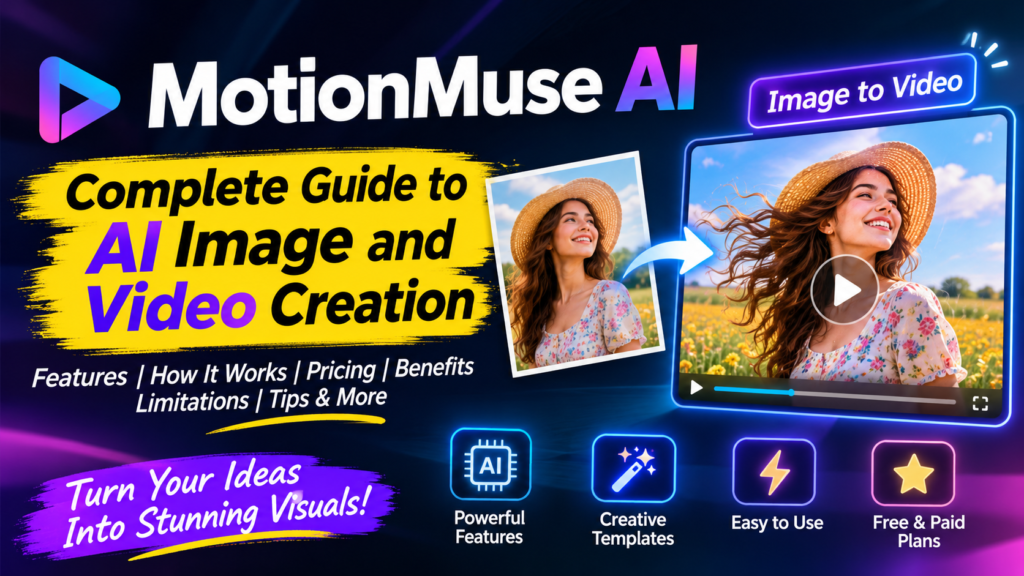
MotionMuse AI is an artificial intelligence-based creative platform designed to help users create visual content with less manual editing. Its most recognizable function is image-to-video generation, where a still image can be transformed into a short animated video.
The concept behind MotionMuse AI is easy to understand. A user starts with a photograph, artwork, character image, product image, or another suitable visual. The platform then applies AI-generated movement to the image. The final result can look more dynamic than the original static picture.
Some public versions of MotionMuse AI describe short video generation of around four to six seconds. Users can select prepared templates or provide their own prompts to guide the animation. The platform also advertises a large collection of AI models and different creative templates, although the exact model selection and technical details may vary.
MotionMuse AI is therefore better understood as a quick visual creation tool rather than a complete professional video editor. It can help create short visual clips, but users who need long videos, detailed timelines, advanced sound editing, or professional post-production may still need other software.
How Does MotionMuse AI Work?
The basic workflow of MotionMuse AI is designed to be simple. A typical process starts with selecting a template or choosing a creative generation option. The user then adds an image from a device or follows the available prompt-based workflow.
After the image is selected, the user can choose a suitable animation style or describe the desired movement. For example, a user might want a portrait to have gentle camera movement, a product image to receive a dynamic presentation effect, or a character image to become a short animated scene.
The AI processes the input and creates the result. Once the generation is complete, users can preview the output and save or share it when the available platform features allow.
The official MotionMuse AI website describes the basic flow as choosing a template, adding a photo, generating the result, and saving it.
This simple workflow is one of the biggest reasons AI visual tools are becoming popular. Users do not necessarily need professional animation knowledge to experiment with motion.
Main Features of MotionMuse AI
Image to Video Generation
The main feature associated with MotionMuse AI is image-to-video generation. This feature allows a static image to become a short moving clip.
For example, imagine having a travel photograph that looks beautiful but feels static on social media. Instead of posting only the image, a creator can use an image-to-video feature to introduce movement and make the visual more engaging.
The AI can create motion based on the selected template or prompt. Since the output is short, this feature is especially suitable for social media experiments, visual posts, creative demonstrations, and quick promotional ideas.
The platform publicly describes short four-to-six-second video generation, making it more suitable for short visual content than long-form filmmaking.
AI Image Creation
Some MotionMuse AI versions also provide AI image generation. This allows users to create new images from written descriptions rather than starting with an existing photograph.
A user can describe a scene, character, object, environment, or creative concept, and the AI can generate an image based on the prompt.
This can be useful for creators who do not have their own photographs. Instead of uploading a source image, they can begin with an idea and use artificial intelligence to create the visual.
Image to Image Transformation
Another useful capability described in MotionMuse AI app information is image-to-image generation. This means an existing image can be transformed into another visual style.
For example, a creator may want to change the artistic appearance of a photograph while keeping its basic concept. Image-to-image tools can help with styles, effects, creative transformations, and visual experiments.
The exact level of control depends on the version of the application being used.
Creative Templates
Templates can make AI content creation easier for beginners. Instead of writing a detailed prompt from scratch, users can select a ready-made creative option and add their own image.
MotionMuse AI promotes templates as an important part of its workflow. Public information describes video, image, and face-related templates, allowing users to start with an existing creative format rather than building everything manually.
Templates are particularly useful when a creator wants quick results. They can also help beginners understand what types of inputs work well with AI generation.
Custom Prompts
Templates are convenient, but custom prompts provide more creative freedom. MotionMuse AI also supports prompt-based generation in versions of the service that advertise custom prompting.
A good prompt should be clear and focused. Instead of asking the AI to perform many complicated actions at once, it is usually better to describe one main movement or visual goal.
For example, a simple prompt might describe a gentle camera movement, a character looking toward the camera, or a product rotating slowly.
Clear prompts can make it easier for an AI system to understand the intended result.
Face and Photo-Based Creative Features
Some MotionMuse AI app listings also describe face-swap and photo-based templates. These features can create highly visual results by applying a supported creative template to an uploaded image.
However, face-related AI tools should always be used responsibly. Users should only upload photographs they own or have permission to use. Using another person’s face without consent can create privacy, reputation, and legal problems.
MotionMuse AI for Social Media Content
Social media creators are among the users who may benefit from MotionMuse AI. Platforms such as short-video social networks depend heavily on visual content, and even a small amount of movement can make a static post feel more dynamic.
A creator can take a photograph, apply an AI animation, and use the resulting clip as part of a short social media post.
This can be useful for creators who do not have advanced editing skills. Instead of spending a long time building an animation manually, they can experiment with templates and AI prompts.
However, creators should always check the final output before publishing. AI-generated videos can sometimes contain unnatural movement, visual distortions, or unexpected changes. Human review is still important.
MotionMuse AI for Digital Artists
Digital artists can also use MotionMuse AI as an experimental tool. An artist might create a detailed character illustration and then add subtle movement to make the artwork feel more alive.
This can be especially interesting for fantasy art, concept art, portraits, digital characters, and creative storytelling.
MotionMuse AI does not replace the artistic process. Instead, it can become another tool in the creative workflow.
An artist can create the original concept using traditional drawing or another AI image generator and then experiment with MotionMuse AI to introduce movement.
MotionMuse AI for Product Visuals
Small businesses and online sellers often need attractive visual content for products. Creating professional promotional videos can be expensive when done through traditional production methods.
AI tools can provide a faster way to experiment with product visuals.
A seller could potentially start with a product image and use image animation to create a short promotional clip. This could then be adapted for social media or other digital channels, depending on the output and platform requirements.
The quality of the original product photograph matters greatly. A clear image with good lighting and a simple background usually gives AI systems a better starting point than a blurry or heavily compressed photograph.
MotionMuse AI for Beginners
One of the strongest advantages of MotionMuse AI is its beginner-friendly concept.
Traditional video editing software can look complicated when someone opens it for the first time. Timelines, layers, transitions, keyframes, audio tracks, filters, and export settings can be confusing.
An AI generator uses a different approach. Instead of manually controlling every part of an animation, the user provides an input and lets the AI handle much of the generation.
This does not mean every result will be perfect. Beginners still need to learn how to choose good images, write useful prompts, and evaluate the generated output.
Still, the lower learning curve can make experimentation much easier.
MotionMuse AI Pricing and Credits
Pricing is an important factor before using any AI generation platform. MotionMuse AI has publicly advertised a free option with starting credits and paid plans with larger credit balances. The advertised web plans include Free, Basic, Pro, and Premium options.
The public pricing page currently describes the Free plan as providing 20 credits for new users. The Basic plan is listed with 500 credits, while Pro provides 2,500 credits and Premium provides 10,000 credits. The same page estimates how many images or videos those credits can produce.
Because AI pricing and offers can change, users should check the current pricing page before purchasing a subscription.
A free plan is useful because it allows users to understand the workflow before spending money. If the generated results do not meet expectations, there is less financial risk when starting with a free option.
Users should also pay attention to credit consumption. AI generation often uses credits for each generation, meaning repeated attempts can consume a balance quickly.
Is MotionMuse AI Free?
MotionMuse AI can be tried through a free option on the publicly advertised service. The current pricing page states that new users can receive 20 credits on the free plan.
However, free access does not necessarily mean unlimited generation. Credits, templates, generation limits, and other features can vary by plan.
Anyone interested in using MotionMuse AI regularly should check the latest terms and pricing before upgrading.
You can visit the official MotionMuse AI website to check the current service information and available plans.
Is MotionMuse AI Easy to Use?
For basic image animation, MotionMuse AI appears to follow a straightforward workflow.
The general idea is to select a creative option, provide an image or prompt, generate the result, and then review the output.
This makes the platform approachable for people who have little experience with professional editing software.
The most important skill is learning how to provide suitable input. A low-quality photograph may produce a weak result, while a clear and well-composed image can give the AI a much better foundation.
Prompt writing also matters. Simple and specific instructions are often easier for an AI system to follow than long prompts containing many unrelated actions.
Benefits of MotionMuse AI
MotionMuse AI has several qualities that can make it useful for modern content creation.
Its simple workflow can save time for people who only need short visual content. Templates can help beginners create results without learning complex prompting techniques. Image-to-video generation can give old or static images a new form. Custom prompts can provide additional creative control.
The availability of a free starting option is another advantage because users can test the experience before choosing a paid plan.
The platform can also fit different creative workflows. A person may use it for social media content, an artist may use it for animation experiments, and a small business may use it for short promotional visuals.
Limitations of MotionMuse AI
Despite its useful features, MotionMuse AI also has limitations.
The first major limitation is output length. Public information describes short videos around four to six seconds. This is useful for short-form content but not enough for complete storytelling or long promotional videos.
Another limitation is creative control. Professional video editors often need precise control over camera movement, timing, transitions, audio, layers, and individual frames. An AI generator generally does not provide the same level of manual control.
AI generation can also produce unexpected results. Faces, hands, objects, backgrounds, and movement may sometimes look unnatural.
Credit usage is another concern. If a creator needs several attempts before getting a useful result, the total credit cost can become higher than expected.
MotionMuse AI and Privacy
Privacy should always be considered when using an AI image platform.
Photos can contain personal information, faces, locations, documents, or other details that users may not want to share with an online service.
MotionMuse AI’s public materials encourage users to use photos they own or have permission to use and to respect privacy, portrait rights, copyright, and local laws.
This is especially important when using images of real people.
Before uploading a personal photograph, users should understand the platform’s privacy policy and terms. It is better to avoid uploading highly sensitive images unless there is a clear reason and the user understands how the service handles them.
Responsible Use of MotionMuse AI
AI image and video tools are powerful, but responsible use is essential.
Users should avoid creating misleading or harmful content involving real people. They should not use someone else’s photograph without permission for inappropriate or deceptive purposes.
Copyright should also be considered. If an image belongs to another creator, transforming it with AI does not automatically remove the creator’s rights.
MotionMuse AI itself advises users to respect privacy, portrait rights, copyrights, and local laws.
Responsible AI use protects both the creator and the people represented in the content.
MotionMuse AI Compared With Traditional Video Editing
Traditional video editing gives creators detailed control. Users can manually place clips on timelines, adjust effects, change audio, control transitions, and edit individual parts of a project.
MotionMuse AI takes a different approach.
Instead of controlling every part manually, the creator provides an image, template, or prompt and allows artificial intelligence to produce a short result.
This makes MotionMuse AI faster for certain tasks but less suitable for projects requiring detailed control.
The two approaches do not necessarily need to compete. A creator can use AI generation for the first stage and traditional editing software for final improvements.
Who Should Use MotionMuse AI?
MotionMuse AI can be useful for beginners who want to experiment with AI-generated visuals without learning complex editing software.
It may also be suitable for social media creators who need short clips, digital artists who want to animate still artwork, and users who want to experiment with AI image transformations.
Small businesses may also find image-to-video generation useful for creating quick product visuals.
However, users who need long videos, detailed editing controls, advanced audio production, or professional cinematic workflows may need a more complete video production platform.
Tips for Getting Better Results
The quality of the source image can make a major difference. Choose a clear image with good lighting and a strong subject.
Keep prompts simple. Instead of describing many movements at once, focus on the main action you want to see.
Try different templates when available. A template that works well for one type of image may not work equally well for another.
Always preview the generated result. Look for unnatural movement, distorted objects, strange facial expressions, or changes that were not intended.
It is also useful to save original files separately. AI generation should be treated as an additional creative step rather than a replacement for the original content.
Is MotionMuse AI Worth Trying?
Whether MotionMuse AI is worth trying depends on what you need.
If your goal is to turn still images into short animated clips with minimal editing, the platform can be interesting. Its simple workflow and template-based approach make it easier for beginners to start experimenting.
If you need professional long-form video editing, MotionMuse AI may not be enough by itself.
The best approach is to test the free option first, evaluate the quality of the generated results, and then decide whether the available paid plans provide enough value for your needs.
It is also important to confirm that you are using the correct MotionMuse product because multiple services and applications use similar MotionMuse branding. Public research shows that different MotionMuse-branded offerings can have different features and terms.
Final Verdict
MotionMuse AI represents the growing trend of using artificial intelligence to make visual content creation easier. Its strongest idea is simple: take an image or creative concept and turn it into something more dynamic with AI.
The platform can be useful for short image-to-video projects, creative experiments, social media content, digital artwork, and quick visual ideas. Templates make the process easier for beginners, while custom prompts can provide additional creative freedom.
At the same time, users should understand its limitations. Short output lengths mean it is not a complete replacement for professional video editing software. AI-generated results may also require multiple attempts, and credit-based systems can become expensive when many generations are needed.
Privacy and responsible use are equally important. Users should only upload images they have the right to use and should avoid creating misleading or harmful content involving real people.
Overall, MotionMuse AI can be a useful option for creators who want a simple way to experiment with AI-generated motion. Its value depends on the type of content a person wants to create, the quality of the source images, the available features, and the amount of control required.
As AI video technology continues to improve, tools such as MotionMuse AI show how traditional visual creation is becoming more accessible. A process that once required advanced editing skills can now begin with a single image and a simple creative idea.
Frequently Asked Questions About MotionMuse AI
What is MotionMuse AI?
MotionMuse AI is an AI-powered creative tool associated mainly with image-to-video generation. It can turn still images into short animated clips using templates or custom prompts. Some versions and app listings also describe image generation, image-to-image transformation, and other creative features.
Can MotionMuse AI turn an image into a video?
Yes. Image-to-video generation is one of the main functions publicly associated with MotionMuse AI. The advertised web service focuses on short AI-generated clips, with public information describing videos around four to six seconds.
Is MotionMuse AI free?
MotionMuse AI offers a free starting option on its publicly advertised service. The current pricing page lists 20 credits for new users, while paid plans provide larger credit balances.
Does MotionMuse AI use templates?
Yes. Templates are an important part of the MotionMuse AI workflow. Users can select creative templates and then provide a suitable image to generate a result.
Can beginners use MotionMuse AI?
Yes. The platform is designed around a relatively simple workflow, making it easier for beginners who do not have advanced video editing experience.
Is MotionMuse AI good for social media?
MotionMuse AI can be useful for short social media visuals because its main video workflow focuses on short clips. However, users should check the final video and make sure its format and quality match the requirements of the social platform they plan to use.
Is MotionMuse AI suitable for professional video editing?
It may be useful as part of a professional workflow, but it should not automatically be considered a full replacement for professional video editing software. Users who need long videos, detailed timelines, advanced audio, and precise editing controls may need additional tools.
Is MotionMuse AI safe to use?
Safety depends partly on how the platform is used. Users should protect personal information, review the service’s privacy terms, and only upload photographs they have permission to use. Responsible use is especially important when working with images of real people.
What makes MotionMuse AI different?
Its main appeal is simplicity. Instead of manually animating an image, users can provide a photo, choose a template or prompt, and let AI generate a short visual result. This makes the process accessible to people who may not have professional editing skills.
Should you try MotionMuse AI?
If you are interested in creating short AI-generated animations from images, MotionMuse AI may be worth testing. Starting with the free option can help you understand the quality and workflow before deciding whether a paid plan is suitable.
Read more about : giftogram