
In this story
MotionMuse is becoming an interesting name in the growing world of artificial intelligence and creative content generation. As AI technology continues to change the way people create images, videos, advertisements, social media posts, and digital stories, tools like MotionMuse are making video creation easier for beginners and experienced creators. Instead of spending hours learning complicated video editing software, users can start with an image and use artificial intelligence to create a short moving video.
The main idea behind MotionMuse is simple. A user provides an image, selects a suitable animation style or gives an instruction, and the AI generates motion from the still visual. This approach can be useful for social media creators, marketers, bloggers, digital artists, content creators, and anyone who wants to turn a normal image into something more engaging.
Modern audiences are used to seeing moving content everywhere. Short videos, animated posts, product demonstrations, promotional clips, and visual stories are now a major part of digital communication. A simple static image can still be useful, but adding natural movement can make the same idea feel more dynamic. MotionMuse focuses on this particular creative need by providing an AI-based way to transform still images into short video clips.
According to the platform’s current information, MotionMuse can create short image-to-video clips, provide templates, support custom prompts, and offer different plans based on credits and generation needs. This makes the platform especially interesting for people who want a simple workflow instead of a traditional editing process.
What Is MotionMuse?
MotionMuse is an AI-powered creative platform designed around image and video generation. Its main purpose is to help users create animated video content from images without requiring advanced traditional video editing skills.
The most important concept behind MotionMuse is image-to-video generation. In a traditional workflow, a person may need to import an image into video editing software, create a timeline, add keyframes, adjust movement, apply transitions, and export the final video. This process can take time, especially for beginners.
With MotionMuse, artificial intelligence handles much of the movement-generation process. Users can start with an image and describe or select the type of movement they want. The AI then attempts to create a short animated result based on the visual information and instructions.
The platform’s current website describes short video generation in the range of approximately four to six seconds, along with templates and custom prompts. Short clips can be useful because they are easy to share on social media and can be used as visual elements in larger content projects.
MotionMuse is therefore not simply about making a picture move. The larger idea is to make AI-powered video creation accessible to people who may not have professional editing experience.
How MotionMuse Works
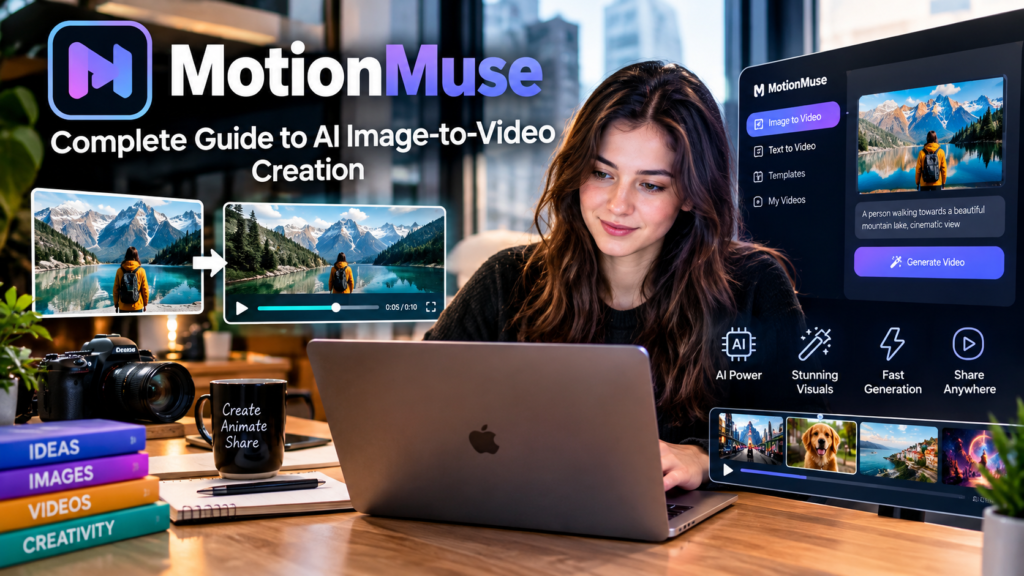
The basic workflow of MotionMuse is designed to be straightforward. A user normally starts by selecting or uploading an image. The image becomes the visual foundation for the generated video.
After choosing the image, the user can select an available animation template or provide a custom instruction. A template can be useful when someone wants a quick result without thinking deeply about prompts. Custom instructions can provide more creative control when the user has a specific idea in mind.
The AI then analyzes the image and attempts to generate movement that matches the selected style or instruction. Depending on the image and request, the movement may involve camera motion, changes in the subject’s position, environmental animation, or other visual effects.
The final result is a short video that can be previewed and used for social media, marketing, creative projects, or other appropriate purposes.
The simplicity of this workflow is one of the most attractive aspects of MotionMuse. A beginner does not necessarily need to understand complicated concepts such as keyframes, masking, motion tracking, or advanced compositing before creating an animated clip.
Why MotionMuse Is Getting Attention
AI video generation has become one of the most active areas of generative technology. Earlier AI tools focused heavily on text generation and image creation, but video generation is becoming increasingly important.
MotionMuse fits into this broader trend by focusing on the transformation of still images into short animated content. This is useful because many people already have images that could become more engaging with movement.
For example, a product photographer may have a high-quality product image but want a short promotional animation. A social media creator may have a portrait that could be transformed into a dynamic clip. A blogger may want to create an animated visual for an article. A marketer may want to turn a campaign image into a short advertisement.
In each situation, the starting point can be the same: an existing image.
This makes MotionMuse interesting because users do not always need to create an entire video from the beginning. They can build on visual material they already have.
MotionMuse for Beginners
One of the biggest advantages of AI creative tools is their ability to reduce the technical barrier for beginners. Traditional video editing can feel difficult when a person has never used professional software.
A beginner may not understand timelines, layers, transitions, frame rates, keyframes, or motion effects. Learning these concepts is possible, but it takes time.
MotionMuse provides a simpler approach. Instead of manually controlling every movement, the user can provide an image and let AI generate a short animation.
This can make experimentation easier. A new creator can test different images, styles, and instructions to understand what produces better results.
However, beginners should also understand that AI generation is not always perfect. The output depends heavily on the quality of the source image and the clarity of the instruction. An unclear image can lead to an unclear result, while a complicated request may produce unexpected movement.
For this reason, MotionMuse works best when users provide strong visual inputs and realistic expectations.
MotionMuse and AI Image-to-Video Generation
Image-to-video generation is one of the most useful areas of modern generative AI. It allows a static image to become a dynamic piece of content.
The process sounds simple, but it requires the AI system to understand different parts of an image. It may need to recognize the main subject, background, objects, lighting, perspective, and other visual details. It then has to generate additional frames that create the impression of movement.
This is why the quality of the source image matters so much.
MotionMuse recommends using high-resolution and well-lit images with clear subjects because poor-quality images can affect the final result. A clean image gives the AI more visual information to work with.
A good source image can therefore make a major difference. If the subject is clear and the composition is simple, the generated motion may appear more natural.
Important Features of MotionMuse
MotionMuse provides several features designed to support AI-based content creation. One of its central features is AI video generation, which allows static images to be transformed into short dynamic clips.
Another useful feature is template-based generation. Templates can help users create animations without writing detailed instructions. This is especially useful for beginners who want to experiment quickly.
Custom prompts provide another level of control. Instead of relying entirely on a predefined animation, users can describe what they want the image to do. Better prompts can often help guide the generation toward a more specific result.
The platform also highlights image generation and AI-assisted image editing as part of its broader creative workflow. This means the platform can potentially support users who want to create or refine visual material before turning it into video.
Cloud-based access is another useful concept. Users do not necessarily need powerful local video-editing hardware to experiment with AI-generated content because the generation process is handled through the online platform.
Using MotionMuse for Social Media Content
Social media is one of the clearest use cases for short AI-generated videos.
Platforms such as Instagram, TikTok, YouTube Shorts, and other short-form channels have created strong demand for quick visual content. Creators need to publish consistently, but creating every video manually can become time-consuming.
MotionMuse can help turn existing images into short animated clips that may be suitable for social content.
For example, a creator could take a portrait and add subtle motion. A fashion creator could animate a clothing image. A travel creator could add movement to a destination photograph. A product creator could create a short promotional animation from a product image.
The important point is that AI-generated motion should support the message rather than distract from it. A simple and natural animation can sometimes look better than an excessive effect.
Creators should also review every generated video before publishing it. AI-generated media can sometimes contain visual inconsistencies, strange movement, or details that were not intended.
MotionMuse for Marketing
Marketing teams are always looking for ways to capture attention quickly. Short videos can be more engaging than static images in many digital environments.
MotionMuse can be useful for turning campaign visuals into animated content. A business could start with a product image and create a short visual clip for social media or promotional material.
This can help small businesses that do not have a dedicated video production team.
Instead of creating every animation manually, marketers can experiment with AI-generated clips and then select the most useful results.
However, businesses should be careful when using AI-generated content commercially. Usage rights can depend on the specific plan and the platform’s current terms. MotionMuse’s FAQ states that commercial use is available on plans that include a commercial license, so users should check the current plan details before using generated material in commercial campaigns.
MotionMuse for Bloggers and Website Owners
Bloggers can also benefit from image-to-video technology. A blog post often contains featured images, illustrations, screenshots, or product visuals.
Turning some of these images into short animations can create additional content for social media promotion.
For example, a technology blogger could create an animated visual from a new device image. A travel website could transform a destination photograph into a short cinematic clip. A fashion website could create movement around a product image.
This approach can help bloggers reuse existing visual assets instead of creating completely new media for every platform.
The result can be particularly useful when a website owner wants to promote an article through short-form video channels.
MotionMuse for Digital Artists
Digital artists can use AI animation tools to explore ideas that would take longer to animate manually.
A finished digital artwork can become the starting point for a moving visual. The artist can experiment with camera movement, environmental motion, or subtle animation.
This does not mean AI replaces artistic creativity. Instead, it can act as an additional creative tool.
Artists still need to decide what the image should communicate, what type of movement fits the artwork, and whether the final result matches the original creative intention.
The strongest use of MotionMuse is therefore not simply pressing a generation button. Creative thinking remains important.
How to Get Better Results With MotionMuse
The quality of the input image is one of the most important factors in AI image-to-video generation. A high-resolution image with good lighting and a clearly defined subject usually provides a better starting point.
Users should also avoid unnecessarily complicated prompts. A clear instruction can be easier for an AI system to interpret than a long description containing many unrelated movements.
For example, instead of requesting many different actions at the same time, a creator can focus on one main motion. This can make the result easier to control.
The composition of the image also matters. Images with a clear subject and enough visual space can provide the AI with a better foundation for movement.
It is also useful to experiment. AI generation is not always predictable, so the first result should not necessarily be considered the final result.
Trying a different image, changing the prompt, selecting another template, or simplifying the desired movement can improve the outcome.
MotionMuse Pricing and Credits
AI video generation requires significant computing resources, so many platforms use credit-based pricing. MotionMuse also uses credits for generation.
Its current pricing information shows a free option with starting credits and paid plans with larger credit amounts. The listed plans include Basic, Pro, and Premium options, with different credit allowances and generation priorities.
Pricing and plans can change over time, so users should always check the current pricing before purchasing a subscription.
The credit system is important because users who generate many videos may consume credits quickly. Someone who only wants to experiment occasionally may find a smaller plan more suitable, while frequent creators may need a larger allowance.
The best approach is to understand how many generations are normally required for a project before selecting a paid plan.
Is MotionMuse Easy to Use?
MotionMuse is designed to make AI video creation easier than traditional editing workflows. The basic process involves selecting an image, choosing an animation approach, generating the video, and reviewing the result.
This makes it accessible to users who may not have experience with professional video software.
However, easy to use does not mean every generation will be perfect. Users still need to understand basic visual principles.
A good image, simple movement, suitable composition, and clear creative goal can significantly improve the overall experience.
The platform is best viewed as a creative assistant rather than a complete replacement for professional video production.
MotionMuse and Content Quality
AI-generated videos can look impressive, but quality control remains important.
Sometimes AI can create unexpected movement. Objects may change shape, facial features may look unusual, or parts of an image may move in ways that do not make physical sense.
These problems are common considerations in generative video technology.
MotionMuse itself notes that AI-generated results can contain artifacts or inaccuracies in its terms. This means users should review generated content before publishing or using it professionally.
A short preview can look impressive at first glance, but careful viewing may reveal small inconsistencies.
For professional projects, human review should remain part of the workflow.
Privacy and Responsible Use
Privacy is another important consideration when using an AI platform.
Users should think carefully about what images they upload. Personal photos, private documents, confidential business materials, and images of other people should not be uploaded without appropriate permission and understanding of the platform’s policies.
MotionMuse’s terms state that users must have the necessary rights and consent regarding people depicted in uploaded material.
This is especially important when working with photographs of real individuals.
AI technology makes it easier to manipulate images, but that does not remove the responsibility to respect privacy and consent.
Users should also avoid creating deceptive content that could mislead people or impersonate another person.
MotionMuse Safety Considerations
Like other AI generation platforms, MotionMuse has rules around prohibited content. Its published policy restricts harmful, illegal, exploitative, non-consensual, and deceptive uses.
These restrictions are important because image-to-video technology can be powerful. A system capable of animating a person’s image can also be misused if users ignore consent and privacy.
Responsible use means creating content that respects the rights of others.
Users should also remember that AI-generated content should not automatically be treated as authentic footage. When content is generated or significantly altered by AI, transparency can be important depending on the situation.
MotionMuse vs Traditional Video Editing
Traditional video editing gives creators detailed control over almost every part of a project. Editors can manually control timing, transitions, effects, audio, camera movements, and many other elements.
MotionMuse takes a different approach.
Instead of manually creating every movement, the AI generates a short animation from an image and instructions.
This makes AI generation faster for certain tasks, but it can also reduce precise control.
Therefore, MotionMuse and traditional editing software should not necessarily be seen as direct replacements for each other.
A creator may use MotionMuse to generate a short visual and then edit that clip inside another video editor.
This combined workflow can provide both speed and creative control.
Advantages of MotionMuse
MotionMuse has several qualities that make it interesting for modern content creators. Its biggest advantage is simplicity. Users can start with an image instead of building a complete video timeline from scratch.
The short generation time can also be useful for rapid experimentation. Instead of spending hours on one animation, creators can test multiple concepts and decide which direction works best.
The use of templates can make the platform easier for beginners, while custom prompts provide additional creative flexibility.
Another advantage is accessibility. A browser-based workflow can be easier for users who do not want to install large editing applications or manage complicated software.
MotionMuse can therefore be useful for people who need quick visual content rather than long and highly edited productions.
Limitations of MotionMuse
Despite its advantages, MotionMuse also has limitations.
Short AI-generated clips are not the same as full professional video production. Users who need long-form storytelling, advanced audio editing, complex timelines, or detailed manual control may require additional software.
AI generation can also produce inconsistent results. A creator may need several attempts before getting a useful output.
Credit-based systems can become another consideration for frequent users. If a project requires many generations, the total credit usage may increase quickly.
Another important limitation is that AI-generated content still requires human judgment. Users should not assume that every generated clip is automatically accurate or ready for professional publication.
Understanding these limitations helps users make better decisions.
Who Should Use MotionMuse?
MotionMuse can be useful for beginners who want to experiment with AI video creation. It can also help social media creators who need short animated content regularly.
Small businesses and marketers may find it useful when they have images but want additional video assets.
Bloggers and website owners can use AI-generated motion to create promotional visuals for articles and social posts.
Digital artists can experiment with animation without learning an entire professional animation workflow.
At the same time, professional video editors who require detailed control may prefer using MotionMuse as one part of a larger production process rather than as their only tool.
How MotionMuse Fits Into the Future of AI Creativity
The development of AI video tools suggests that the distance between an idea and a finished visual is becoming smaller.
In the past, turning an image into a video often required specialized software and technical skills. Generative AI is changing that process.
A creator can now start with a simple visual concept and use AI to explore motion, animation, and storytelling possibilities.
MotionMuse represents this broader shift toward faster and more accessible creative production.
As AI models improve, image-to-video systems may become better at understanding motion, physics, lighting, camera behavior, and human movement. This could make AI-generated videos more consistent and useful for professional applications.
However, human creativity will remain important. AI can generate possibilities, but people still need to decide what is meaningful, attractive, useful, and appropriate.
Tips for Creating Better AI Videos
A strong image should always be the starting point. High-resolution images with clear subjects can give the AI more information to work with.
Simple instructions are usually better than confusing instructions. If the main goal is camera movement, focus on camera movement. If the goal is subject motion, explain the subject motion clearly.
Creators should also avoid expecting an AI tool to understand every detail perfectly. Reviewing several results can help identify the strongest output.
It is also useful to think about the final destination before generating the video. A clip intended for a social media post may have different requirements from a video being used on a website or advertisement.
The best workflow is usually creative, experimental, and practical.
Is MotionMuse Worth Trying?
For people interested in AI image-to-video creation, MotionMuse can be worth exploring because it focuses on a simple and increasingly popular type of generative content.
The platform is especially interesting for users who want short animations from existing images without learning a complicated editing workflow.
However, whether it is worth paying for depends on individual needs. Casual users may prefer to test the available free option first. Frequent creators should consider credit usage, output quality, commercial rights, and the features included in each plan before subscribing.
Anyone interested in trying the platform should use the official MotionMuse website and carefully check its latest terms, pricing, and available features before creating an account or making a payment. MotionMuse official website
Final Thoughts on MotionMuse
MotionMuse represents an interesting part of the rapidly developing AI video generation industry. Its focus on turning static images into short animated clips makes it approachable for creators who want faster ways to produce visual content.
The platform can be useful for social media creators, marketers, bloggers, artists, and beginners who want to experiment with AI-generated motion. Its template-based workflow can simplify the creative process, while custom prompts can give users more control over the type of animation they want.
At the same time, users should understand that AI-generated content is not always perfect. Good source images, clear instructions, careful review, and responsible use are all important for achieving better results.
MotionMuse should therefore be viewed as a creative tool rather than a complete replacement for human creativity or professional editing.
The future of digital content is likely to include a combination of human ideas and AI-powered production. Tools such as MotionMuse can help creators move from a simple image to an engaging animated concept much faster than traditional workflows.
As AI video technology continues to improve, platforms focused on image-to-video generation may become even more capable. Better motion, improved consistency, stronger prompt understanding, and more creative controls could make this type of technology useful across marketing, entertainment, education, social media, design, and many other industries.
For anyone interested in exploring modern AI creativity, MotionMuse is a platform worth understanding. Its simple concept, image-to-video workflow, creative templates, and AI-powered generation make it part of the larger movement toward faster and more accessible digital content creation.
The most important thing is to use the technology thoughtfully. AI can help create motion, but the quality of the final content still depends on the idea behind it, the image selected, the instructions provided, and the human decisions made before publishing.
In that sense, MotionMuse is not just about making images move. It is about giving creators another way to turn visual ideas into engaging digital experiences.
Read More About : super.com reviews